Once again, we have some important Exchange Security Updates, released with the March 2022 Microsoft Updates.
The latest Exchange Security Updates addresses vulnerabilities found in the following Exchange Servers:
- Exchange 2013
- Exchange 2016
- Exchange 2019
More about the vulnerabilities, see the CVEs:
- CVE-2022-23277 | Microsoft Exchange Server Remote Code Execution Vulnerability
- CVE-2022-24463 | Microsoft Exchange Server Spoofing
The Security Update is available for the specific Cumulative Update level (CU) your Exchange is running, if you are not up-to-date, to the latest CU, you might have to update the CU before applying the Security Update.
The update path is the following:
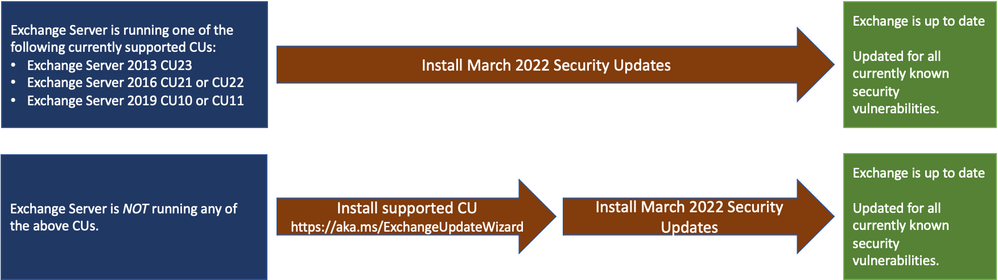
If you are uncertain, about what Exchange Server updates are needed and what current build, your Exchange Servers are running, you can use the Exchange Server Health Checker script to inventory your servers.
If you only have an Exchange Hybrid running, you will still need to update your Exchange environment. You do not need to re-run the Hybrid Configuration Wizard (HCW) after applying updates.
See the original blog post for more info and this, as well use the new Exchange Update Wizard, if in doubt about the upgrade process:
If you manually install the November 2021 Exchange Security Updates, they can be downloaded here:
Download the Security Update that is specific to the CU, your Exchange Server is running.
Remember if you install them manually, the install (.msp file) needs to be run from an elevated command prompt.
More details from the original Exchange Team blog post:
It is recommended to update your Exchange Servers as soon as possible.
/Happy Patching! 🙂