
On this page
This post is part of the Email Security Foundations series.
What SPF actually does
SPF, Sender Policy Framework, is simply a way to publish a list in DNS of which servers are allowed to send email for your domain.
When a receiving mail server gets a message claiming to be from yourdomain.com, it looks up your SPF record and checks whether the sending server is on that list.
That’s it.
That’s the whole idea.
Everything else is just details, and this is where things usually go wrong.
Breaking down an SPF record
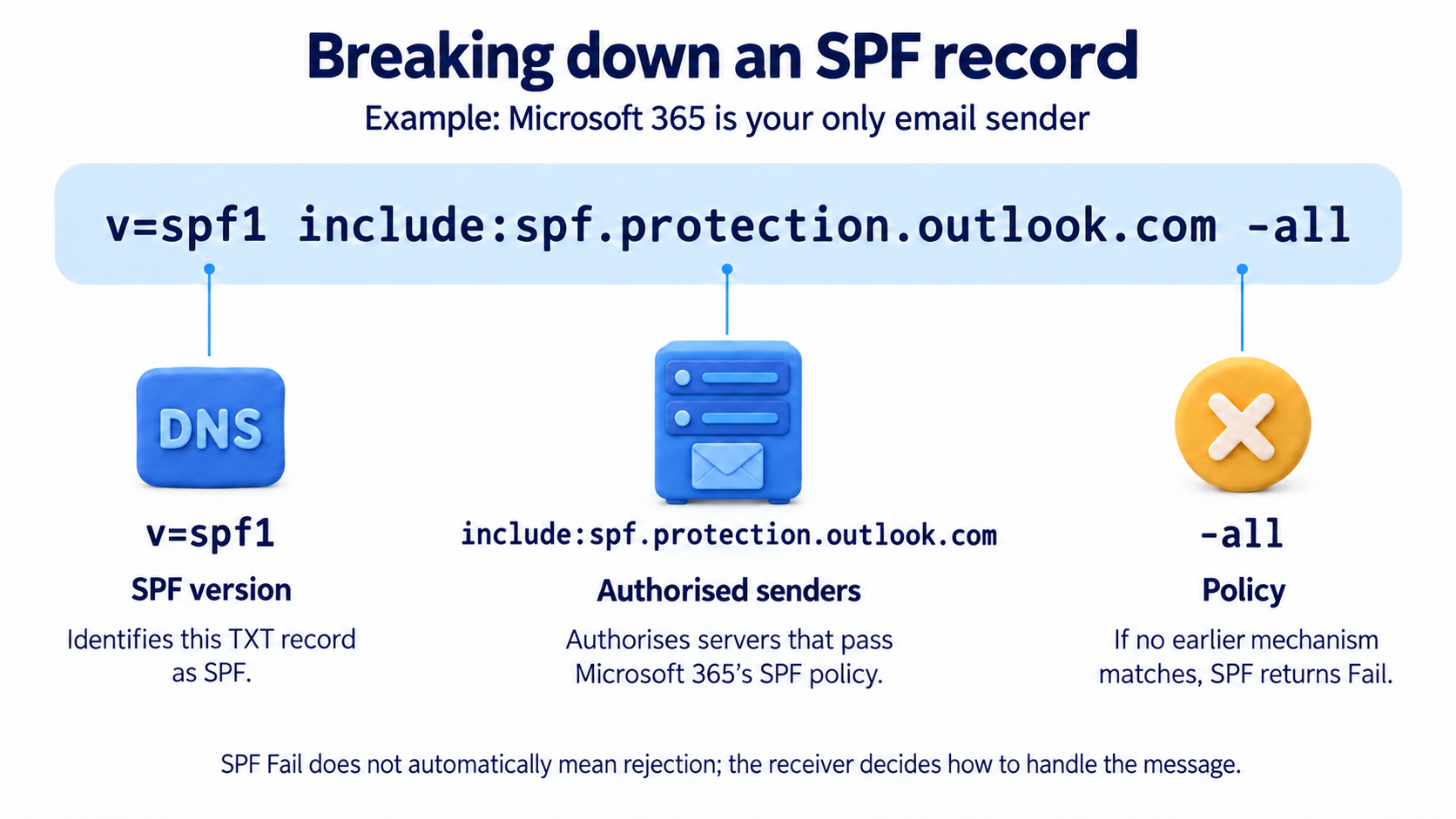
An SPF record is a DNS TXT record on your domain (e.g. yourdomain.com). A very typical one for Microsoft 365 and Exchange Online tenant looks like this:
v=spf1 include:spf.protection.outlook.com -allWhat each part means:
v=spf1- This just tells the world that this TXT record is an SPF record.
include:spf.protection.outlook.com- This authorizes Microsoft 365 to send email for your domain.
-all- This is the important part. It tells receiving servers to reject anything that does not match what is listed.
Using ~all instead would be a soft fail. The message is accepted but marked as suspicious. Most properly configured domains use -all.
Configuring SPF for Exchange Online
If Exchange Online is the only service sending email for your domain, the setup is very simple. You add this TXT record to your domain’s DNS:
v=spf1 include:spf.protection.outlook.com -allIf you also send mail from third‑party services like a marketing platform, a ticket system, or an ERP solution, each of those needs to be included as well.
Your provider will give you an include: statement. You add those before -all, for example:
v=spf1 include:spf.protection.outlook.com include:sendgrid.net include:mail.zendesk.com -allTo check what your current SPF record looks like, you can run this PowerShell command:
$domain = "yourdomain.com"
Resolve-DnsName -Name $domain -Type TXT |
    Where-Object { $_.Strings -match "v=spf1" } |
Select-Object -ExpandProperty StringsThe 10 lookup limit and why it matters
SPF has a hard limit of 10 DNS lookups per evaluation.
Every include: counts as one lookup, and many of those includes trigger additional lookups behind the scenes. It is very easy to hit the limit without realizing it, especially if you use several third‑party senders.
When the limit is exceeded, SPF returns a PermError. Most receiving servers treat that as a failure.
The result is that legitimate mail suddenly starts getting rejected, and it is often not obvious why.
To see how close you are to the limit, use a SPF checker tool. There are many tools available for free like MXToolbox, EasyDmarc or Dmarcian’s SPF checker.
If you are close to the limit, the usual fix is to flatten the SPF record by replacing include statements with the actual IP ranges they resolve to.
What SPF does not protect you from
SPF only checks the envelope from address. This is the technical sender address used during the SMTP conversation.
It does not check the header from address, which is the friendly sender your users actually see in Outlook.
That means an attacker can pass SPF on the envelope from while still spoofing your domain in the visible from field. This is exactly why DMARC exists. DMARC adds alignment checks between the two. We will get to that later in the series.
SPF also breaks when email is forwarded. When a message is forwarded, the sending IP changes and SPF fails on the next hop. DKIM handles this much better, which is why you need both.
Conclusion: why SPF actually matters
SPF exists to answer one basic question: is this server allowed to send email for this domain.
Without SPF, there is no answer to that question at all. Anyone can send mail as your domain, and the receiving system has no reason to doubt it.
SPF will not stop phishing on its own. It was never meant to. It does one specific job, and it does it early in the mail flow. That alone already removes an entire class of trivial spoofing attacks.
More importantly, SPF is a prerequisite. DKIM and DMARC both depend on it being in place and reasonably clean. If SPF is missing, broken, or hitting lookup limits, everything built on top of it becomes unreliable.
That is why SPF comes first in this series.
Get it right. Keep it simple. Stay within the lookup limits. Treat it as a foundation, not a checkbox.
Once SPF is solid, you can move on to the next layer with confidence.
Next up
Questions or edge cases from your own environment? Drop them in the comments.
1 thought on “SPF deep dive – how it works and how to configure it”
Comments are closed.