
On this page
- Before we go deep, here is the map
- The three problems email security standards solve
- SPF: the guest list
- DKIM: the wax seal
- DMARC: the policy that ties it together
- DANE and MTA‑STS: encrypted transport you can trust
- BIMI: the logo in the inbox
- How these layers fit together
- Run this to see your current state
This post is part of the Email Security Foundations series. The goal of the series is simple. Explain SPF, DKIM, DMARC, DANE, MTA‑STS, and BIMI in a way that actually helps Microsoft 365 admins run safer email.
Before we go deep, here is the map
In post #01 we looked at why email authentication still matters and why spoofing is still so effective.
Before diving into each technology on its own, it helps to see the full picture first. What each standard does, which problem it solves, and how they fit together.
Think of this as the map before the journey. From post #03 and onwards we go deep on each technology. This post is just about orientation.
The three problems email security standards solve
All six technologies covered in this series exist to solve one of three core problems.
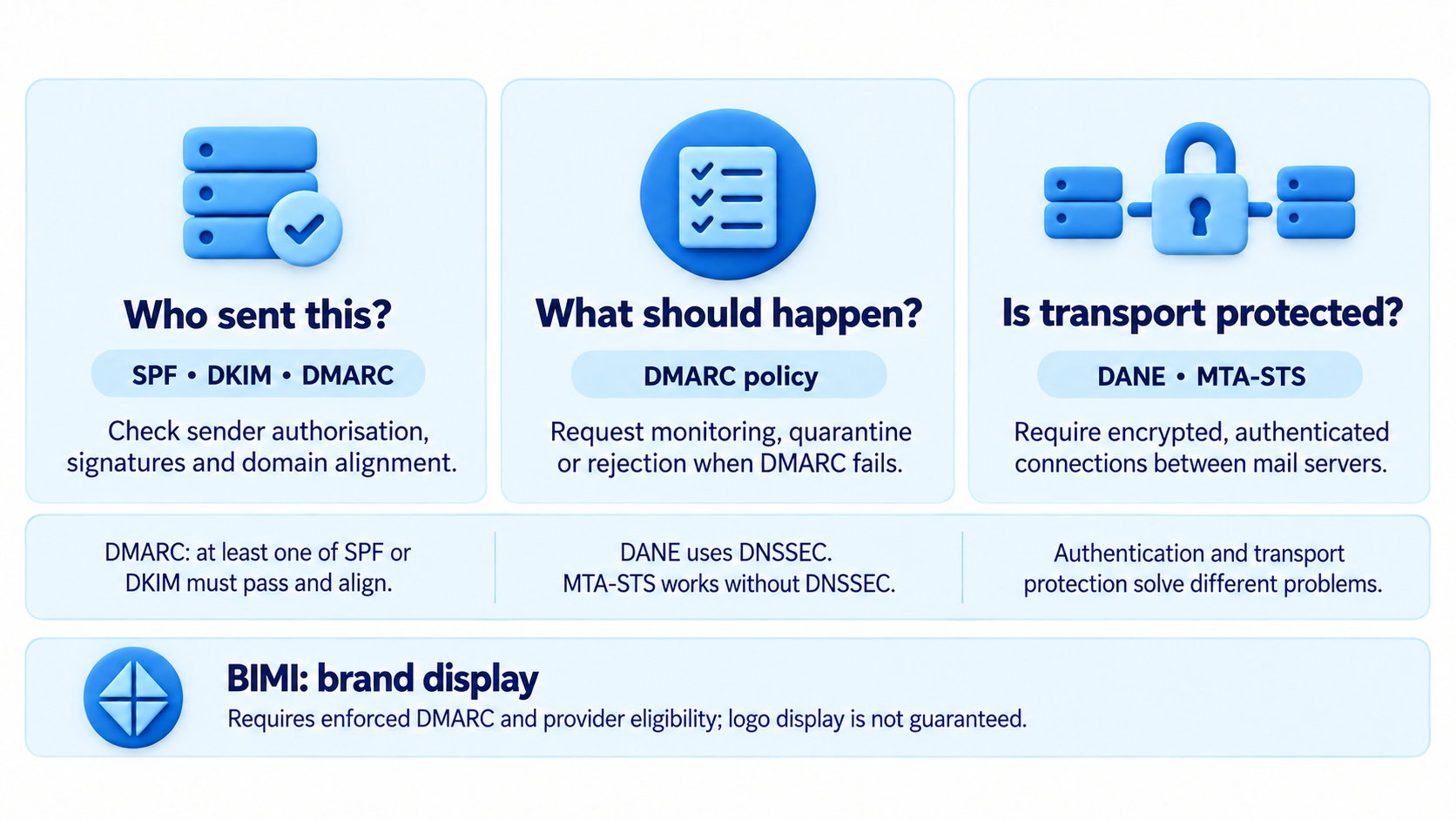
Who sent this?
- Is the email actually from the domain it claims to be from?
- This is where SPF, DKIM, and DMARC live.
What should we do about it?
- If an email fails authentication, what happens next?
- This is DMARC’s policy layer.
Was it intercepted in transit?
- Even if the email is legitimate, was the connection between mail servers encrypted and verified?
- This is where DANE and MTA‑STS come in.
BIMI sits slightly outside this model. Since it is not really a security control. It is more of a reward for having the others in place. Get authentication right and your logo shows up in the inbox.
SPF: the guest list
SPF stands for Sender Policy Framework. It lets you publish a list in DNS of which mail servers are allowed to send email for your domain.
When a receiving server gets a message claiming to be from yourdomain.com, it checks your SPF record to see if the sending server is on the list.
- If it is: SPF passes.
- If it is not: SPF fails.
The concept is simple, but the limitations matter. SPF only checks the envelope from address, not the header from that users actually see. That is one of the reasons SPF alone is not enough and why DMARC exists.
We go deep on SPF in posts #03 and #04.
DKIM: the wax seal
DKIM stands for DomainKeys Identified Mail. Where SPF checks where a message came from, DKIM proves that the message content has not been modified after it was sent.
When you send an email, your mail server adds a cryptographic signature to the message headers. The receiving server looks up your public key in DNS and verifies the signature. If the message was altered after signing, verification fails.
One of the big advantages of DKIM is that it survives forwarding. When an email is forwarded, the sending IP changes and SPF breaks. The DKIM signature travels with the message and stays valid.
We go deep on DKIM in posts #05 and #06.
DMARC: the policy that ties it together
DMARC stands for Domain‑based Message Authentication Reporting and Conformance. This is the layer that gives SPF and DKIM real enforcement.
DMARC lets you publish a policy in DNS telling receiving servers what to do when mail fails SPF or DKIM. Do nothing, quarantine it, or reject it outright.
It also introduces alignment. This checks that the domain in the visible header from matches the domain that passed SPF or DKIM.
Without DMARC, an attacker can still spoof your domain even if SPF and DKIM exist. With DMARC set to p=reject, that door closes.
DMARC also gives you reporting. Receiving servers send aggregate data showing who is sending mail using your domain. That visibility is critical before tightening policy.
We go deep on DMARC in posts #07, #08, and #09.
DANE and MTA‑STS: encrypted transport you can trust
SPF, DKIM, and DMARC deal with message authentication. DANE and MTA‑STS solve a different problem. Making sure the connection between mail servers is encrypted and cannot be silently downgraded.
By default, email uses opportunistic TLS. Servers try to encrypt, but if the other side does not support it, they fall back to clear text. That fallback can be abused.
DANE uses DNSSEC‑signed records to publish which TLS certificate a mail server must present. If it presents something else, the connection is refused.
MTA‑STS achieves a similar result without DNSSEC. It uses a policy file hosted on your domain to enforce TLS.
We cover both in a later post.
BIMI: the logo in the inbox
BIMI stands for Brand Indicators for Message Identification. Once your DMARC policy is at p=quarantine or p=reject, you can publish a BIMI record pointing to your logo.
Supporting mail clients like Gmail and Apple Mail will then display that logo next to your messages.
BIMI does not improve security by itself, but it is a visible signal to recipients that your mail is authenticated. It is also a strong incentive to get everything else right first.
We cover BIMI in post #11.
How these layers fit together
In plain terms:
- SPF and DKIM work independently, but both are needed for DMARC to be effective
- DMARC requires at least one of SPF or DKIM to pass and align
- BIMI requires DMARC set to p=quarantine or p=reject
- DANE requires DNSSEC on your domain
- MTA‑STS works without DNSSEC and can complement or replace DANE
You do not need all six for a solid baseline. SPF, DKIM, and DMARC at p=reject is the most important and gets you most of the way there.
DANE, MTA‑STS, and BIMI are the advanced layer you add on top.
Run this to see your current state
Before moving on to post #03, it is worth knowing where you stand today.
Keep the output. By the time you reach the end of this series, every line should have something useful in it.
# Replace with your actual domain
$domain = "msdigest.net"

function Get-DnsTxt {
    param($Name)
    try {
        $result = Resolve-DnsName -Name $Name -Type TXT -ErrorAction Stop
        $strings = $result | ForEach-Object {
            if ($_.Strings) { $_.Strings }
        }
        if ($strings) { return $strings }
        else { return "(record found but no string data)" }
    }
    catch {
        return "(not found)"
    }
}

function Get-DnsCname {
    param($Name)
    try {
        $result = Resolve-DnsName -Name $Name -Type CNAME -ErrorAction Stop
        return $result.NameHost
    }
    catch {
        return "(not found)"
    }
}

Write-Host "`n--- SPF ---" -ForegroundColor Cyan
Get-DnsTxt -Name $domain

Write-Host "`n--- DMARC ---" -ForegroundColor Cyan
Get-DnsTxt -Name "_dmarc.$domain"

Write-Host "`n--- DKIM selector1 (Exchange Online default) ---" -ForegroundColor Cyan
Get-DnsCname -Name "selector1._domainkey.$domain"

Write-Host "`n--- MTA-STS ---" -ForegroundColor Cyan
Get-DnsTxt -Name "_mta-sts.$domain"

Write-Host "`n--- BIMI ---" -ForegroundColor Cyan
Get-DnsTxt -Name "default._bimi.$domain"Next up:
Email Security Foundations #03: SPF deep dive, how it works and how to configure it
Questions or edge cases from your own environment? Drop them below.
1 thought on “SPF, DKIM, DMARC, DANE, MTA-STS and BIMI explained”
Comments are closed.