
On this page
This post kicks off the Email Security Foundations series here on MSDigest.net. It’s a practical, no‑nonsense walkthrough of SPF, DKIM, DMARC, DANE, MTA‑STS, and BIMI written specifically for Microsoft 365 admins who want email to stop being the weakest link.
Email spoofing remains one of the most effective attacks on the internet, largely because most organizations still allow it.
The attack that really should not still work in 2026
A classic example is a Business Email Compromise (BEC) attack.
A CFO receives an email that appears to come from the CEO.
Looking at the message:
- The name looks right.
- The tone looks right.
- The request is urgent.
The email says:
Please transfer €85,000 to this supplier before end of day.
And the CFO does exactly that.
But the CEO never sent the email.
- No malware.
- No compromised account.
- No fancy exploit.
Example of a Business Email Compromise message impersonating an executive:
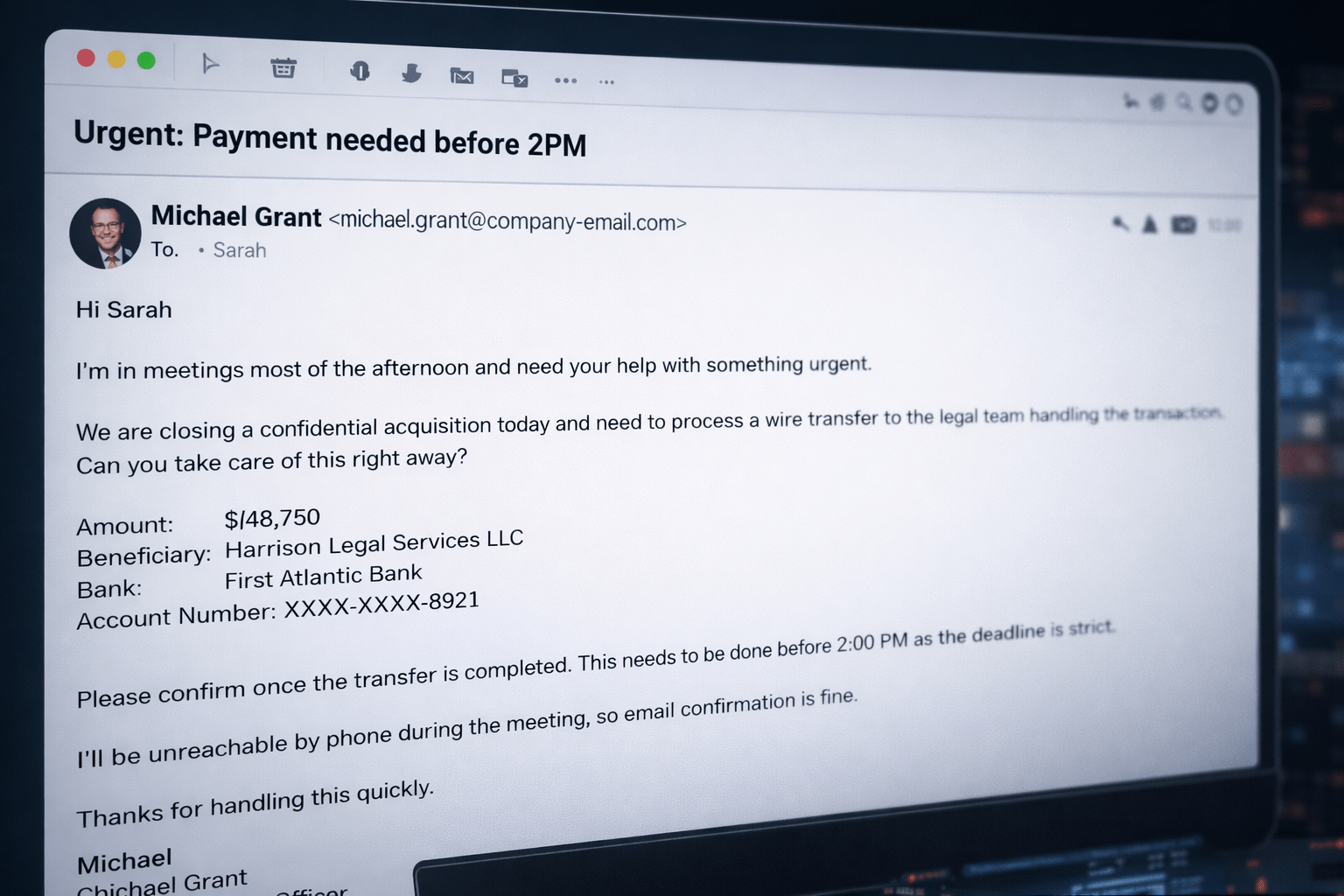
Someone (the attacker) just sent an email pretending to be someone else and the mail system accepted it without question.
The scale of the problem
Microsoft reported detecting 35 million attempted BEC attacks between April 2022 and April 2023, highlighting how widespread this technique still is.
According to the FBI, BEC attacks cost businesses $2.9 billion in 2023. More than ransomware. And in most cases, the root cause was simple: fake emails were trusted.
The Microsoft Digital Defense Report 2025 adds an important detail. While BEC accounted for only 2% of observed threats, it was responsible for 21% of successful attacks, compared to 16% for ransomware.
Low volume. High impact.
The root cause
This works for a painfully simple reason: email was never designed with authentication in mind.
When SMTP was created in 1982, the assumption was that everyone on the network could be trusted.
That assumption hasn’t aged well.
What makes this especially frustrating is that the tools to fix the problem already exist. They’re free. They’re standards‑based. And in most Microsoft 365 tenants, they’re just sitting in DNS — unconfigured.
That’s what this series is about.
Why forging an email is trivially easy
Every email has two “from” addresses, even though most users only ever see one.
The envelope from is used by mail servers for delivery and bounce handling. End users never see it.
The header from is the friendly address shown in Outlook — the one your CFO sees when the message claims to be from the CEO.
SMTP doesn’t require these to match. In fact, it barely validates either of them.
An attacker can put [email protected] in the header from field, send the message from somewhere else entirely, and — unless controls are in place — the email is delivered. No warnings. No errors. No questions.
SPF, DKIM, and DMARC aren’t patches to SMTP. They’re layers bolted onto a protocol that was never built for a hostile internet.
What a failing header actually looks like
Every email includes headers that show how it was processed.
A healthy message from a properly configured tenant typically looks like this:
Authentication-Results:
spf=pass smtp.mailfrom=yourdomain.com;
dkim=pass header.d=yourdomain.com;
dmarc=pass action=none header.from=yourdomain.com;A suspicious one often looks more like this:
Authentication-Results:
spf=none smtp.mailfrom=external.com;
dkim=none;
dmarc=fail action=none header.from=yourcompany.com;That last line is the important part:
dmarc=fail action=noneThe message failed authentication and was delivered anyway.
Logged, ignored, inboxed.
The recipient never knew.
The good news is that spoofing your domain is preventable.
Modern email authentication standards like SPF, DKIM, and DMARC exist specifically to solve this problem and that’s exactly what we’ll build step by step in this series.
What the rest of this series covers
Over the next eleven posts, we’ll go through the entire email authentication stack, one layer at a time:
- SPF
- DKIM
- DMARC
- DANE
- ARC
- MTA‑STS
- BIMI
Each post includes concrete configuration guidance for Exchange Online and Microsoft Defender for Office (Microsoft 365), common mistakes I keep seeing in real tenants, and PowerShell you can run yourself.
The series wraps up with a full health‑check toolkit that audits any domain and gives you a clear, honest picture of where things stand.
Run this before you read the next post
This takes two minutes.
Run this PowerShell script against your own domain, replace “yourdomain.com” with your own domain, to see what your SPF, DKIM, and DMARC DNS records look like today:
# Replace with your actual domain
$domain = "yourdomain.com"

Write-Host "`n--- SPF Record ---" -ForegroundColor Cyan
Resolve-DnsName -Name $domain -Type TXT |
    Where-Object { $_.Strings -match "v=spf1" } |
    Select-Object -ExpandProperty Strings

Write-Host "`n--- DMARC Record ---" -ForegroundColor Cyan
Resolve-DnsName -Name "_dmarc.$domain" -Type TXT |
    Select-Object -ExpandProperty Strings

Write-Host "`n--- DKIM selector1 (Exchange Online default) ---" -ForegroundColor Cyan
Resolve-DnsName -Name "selector1._domainkey.$domain" -Type CNAME |
Select-Object -ExpandProperty NameHostNo SPF record means anyone can send mail as your domain right now.
No DMARC record means there’s no policy telling the world what to do when authentication fails.
If the output is mostly empty, you’re not alone and that’s exactly why this series exists.
Modern email authentication controls like SPF, DKIM, and DMARC are no longer optional. They’re baseline defenses for any organization running Microsoft 365.
Got a question, edge case, or horror story from your own environment? Please drop it in the comments.
Reference links:
1 thought on “Email Security Foundations #01: Why email is still the most dangerous attack surface”
Comments are closed.